Hypervisor & Physical Systems
This category provides a compact, practical framework for securing and standardizing hypervisors and physical systems across all PCP sites. It is designed to accelerate implementation, ensure compliance readiness, and reduce operational and security risks.
Aligned with the Distinct Compute Reference Design (DRD) and the principles of ISO/IEC 27001, the guide delivers a structured approach to virtualization security and governance. It focuses on creating a consistent PCP global baseline while allowing flexibility for local requirements.
Key objectives include:
- Standardization: Harmonize hypervisor configurations and operational practices across VMware ESXi, Microsoft Hyper-V, Nutanix AHV, and KVM environments.
- Security Hardening: Apply best practices for authentication, certificate management, logging, and monitoring to protect against vulnerabilities.
- Network Segregation & Redundancy: Implement robust workload isolation and high-availability designs to minimize risk and ensure resilience.
- Visibility & Control: Establish complete asset transparency and centralized governance to eliminate shadow IT and enforce compliance.
By following this guide, PCP teams can execute quickly, demonstrate ISO/IEC 27001 readiness, and significantly reduce risk exposure—without waiting for lengthy certification processes.
Purpose & Scope
- To create a unified, secure virtualization environment that supports global consistency, minimizes vulnerabilities, and enables compliance with ISO/IEC 27001 without delaying operations for certification audits.
Platforms Covered: VMware ESXi, Microsoft Hyper-V, Nutanix AHV, and KVM where applicable.
Focus Areas:
- Asset registration and visibility
- Secure management interfaces and networks
- Encryption and protocol hardening
- Certificate management
- Centralized logging and monitoring
- Directory-based authentication and MFA
- Redundancy aligned with site classification
- Hypervisor-specific hardening baselines
Summary & Outcome
| no. | Control | Focus | Outcome |
|---|---|---|---|
| 04.01 | Asset Visibility | Register assets in Matrix42, ADAM & CMDB | Complete inventory |
| 04.02 | Dedicated Management Interface | Separate Management VLAN | Secure admin access |
| 04.03 | Management Network Placement | Integrate with AD / VPN | Controlled access |
| 04.04 | Disable Insecure Protocols | Block HTTP/Telnet/FTP | Encrypted traffic |
| 04.05 | Valid ABB Certificates | ABB PKI certs | Trusted connections |
| 04.06 | Central Log Forwarding | Send logs to Splunk | Audit-ready |
| 04.07 | Directory Authentication | AD / Entra ID | No shared accounts |
| 04.08 | Local Account Policy & MFA | Enforce ABB policy | Strong auth |
| 04.09 | Redundancy & Site Class | Design per classification | High availability |
| 04.10 | Hypervisor Hardening | ABB baseline | Reduced attack surface |
| 04.11 | Monitoring & Health | Metrics & alerts | Proactive ops |
| 04.12 | vCenter Hardening | ABB baseline | Secure environment |
| 04.13 | ESXi Hardening | ABB baseline | Secure environment |
| 04.14 | Hyper-V Hardening | ABB baseline | Secure environment |
| 04.15 | Nutanix AHV Hardening | ABB baseline | Secure environment |
| 04.16 | KVM Hardening | ABB baseline | Secure environment |
Control Checklist
| Control Number | Category | Question | Description | Link to How to Guide |
|---|---|---|---|---|
| 04.01 | Hypervisor | All Hypervisors are recorded in ServiceNow | Register each host (and vCenter) in ServiceNow CMDB and ADAM with correct CI type, owner, location, IPs, and tags. Attach evidence (CMDB link/export). | bulk single |
| 04.02 | Hypervisor | All Hypervisors have a dedicated management interface | Ensure a separate management NIC/vSwitch per host; manage via vCenter/SCVMM; document VLAN/ACLs. | |
| 04.03 | Hypervisor | All Hypervisors have the management interface in the management network | Place mgmt interfaces in the management VLAN; restrict access via Jump Host/VPN; integrate with AD/Entra ID. | |
| 04.04 | Hypervisor | All Hypervisors have insecure protocols disabled (HTTP, Telnet, etc.) | Disable/block HTTP, Telnet, FTP and other plaintext services; enforce HTTPS/SSH; apply host firewall rules. | |
| 04.05 | Hypervisor | All Hypervisors have installed only valid ABB certificates | Use ABB PKI certificates on hosts and vCenter; remove self-signed certs; track renewal before expiry. | |
| 04.06 | Hypervisor | All Hypervisors have log forwarding enabled | Forward host and vCenter logs to Splunk with time sync; document exceptions for air-gapped sites. | |
| 04.07 | Hypervisor | All Hypervisors have authentication configured via ABB AD or Entra ID | Enable directory authentication and RBAC; no shared accounts; prefer MFA where supported. | |
| 04.08 | Hypervisor | All network devices having local accounts are configured per ABB account policy – Password Expiration | Where local accounts exist, enforce complexity and rotation/expiration; prefer domain auth; enable MFA where available. | |
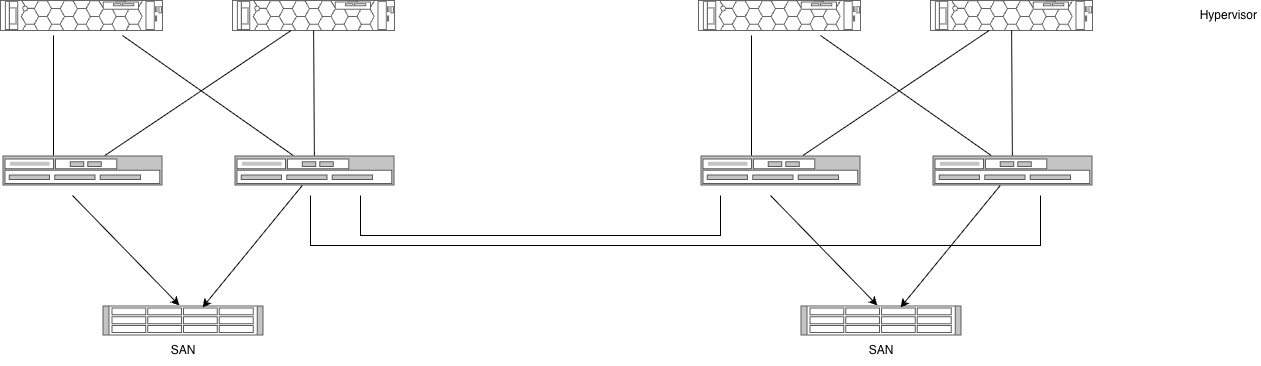
| 04.09 | Hypervisor | All Hypervisors are configured in a redundant way | Engineer HA/cluster, dual PSUs/NICs, redundant storage and networking per site class; obtain PAIS approval for critical sites. | |
| 04.10 | Hypervisor | All Hypervisors are configured in line with the ABB hardening policy (where available) | Apply ABB hardening baseline; disable unused services, secure shell, NTP/syslog configured, secure boot, audit settings. | |
| 04.11 | Hypervisor | All Hypervisors are monitored with a tool providing: device status; utilization (CPU/RAM/Network/Disk) and relative performance indicators; device errors; notifications via mail or ticket; historical data ≥6 months | Implement monitoring and alerting; retain metrics ≥ 6 months; route alerts to mailbox or ticketing; review regularly. | |
| 04.12 | VMware | The VMware vCenter is configured in line with the infosec standards (hardening policy) | Apply vCenter baseline (e.g., 9AAD132452 v3.3): SSO, MFA, RBAC, logging to Splunk, PKI certs, secure services. | |
| 04.13 | VMware | The VMware ESXi are configured in line with the infosec standards (hardening policy) | Apply ESXi baseline (e.g., 9AAD132074 v3.3): Lockdown Mode, SSH policy, firewall, NTP, syslog, secure boot. | |
| 04.14 | Hyper-V | Hardening not yet released | Track ABB baseline; meanwhile apply Microsoft STIG/CIS controls; document gaps/exceptions. | |
| 04.15 | Nutanix | Hardening not yet released | Track ABB baseline; meanwhile apply Nutanix Security/CIS guidance; document gaps/exceptions. | |
| 04.16 | KVM | Hardening not yet released | Track ABB baseline; meanwhile apply CIS benchmarks for host OS and KVM; document gaps/exceptions. |
Quick Checklist
- Asset in ADAM and CMDB
- Dedicated management interface
- Mgmt interface on management network
- Insecure protocols disabled
- ABB certificate installed
- Splunk log forwarding configured (or exception recorded)
- AD / Entra ID auth (no shared accounts)
- Local account policy + MFA (where supported)
- Redundancy per site classification (PAIS approval if needed)
- Hardening applied
- Monitoring active; metrics retained ≥ 6 months
- vCenter baseline applied
- ESXi baseline applied
- Track Hyper-V / Nutanix / KVM baselines and adopt on release
Mission Critical
References
- Distinct Compute: Reference Design
- VMware Architecture Blueprint & Guideline for SDC (P3 Hardening)
- Site Business Impact Assessment
- Information Classification & Handling Standard
- Distinct IT Asset Management
- Identity & Access Control Standard
- ABB baselines repository (vCenter, ESXi)
- Splunk onboarding guides