Infrastructure zones — country-level model
One-liner
A simple, repeatable three-zone model for every country: Corporate Network → Shared Platform → Workloads, each workload is defind in 5 pre Designt Zone with Systems or Projekt in this Zones. Each System or Projekte has its own segregation models so it is possible to choose for each System the rights and obligations. You Choose !
Overview
Every country implements the same structure:
- Corporate Network — Office IT and enterprise services used by everyone.
- Shared Platform — The managed management network that shields and operates Workloads (jump hosts, RDG, logging, backup, scanning).
- Workloads — Engineering, factory, lab, and application systems. Each workload uses one segregation model: Air-gapped, Fully Segregated, Segregated, or Segregated-Integrated.
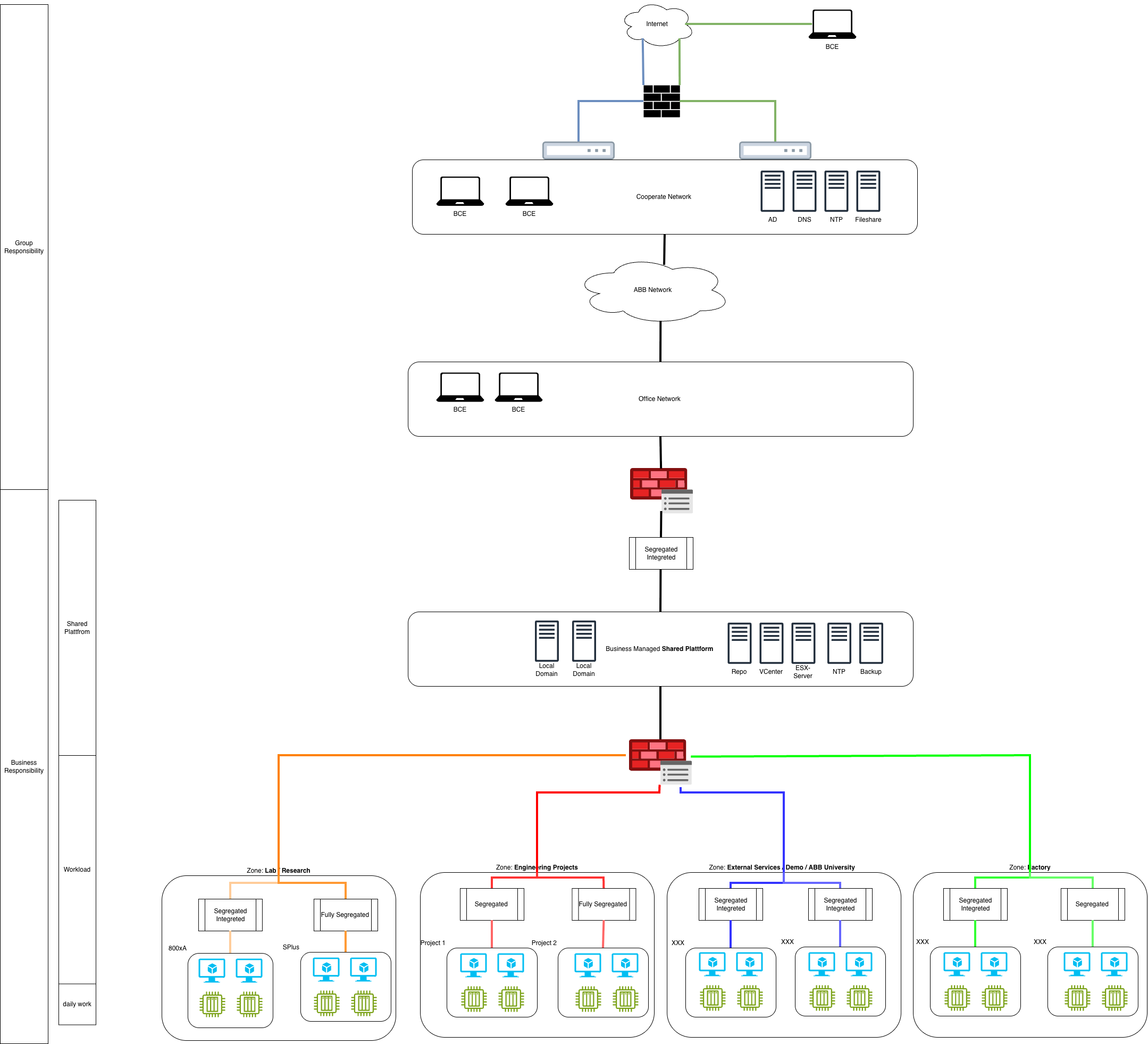
Zone 4 — Corporate Network
- Purpose: Office connectivity, collaboration tools, standard identity (Entra ID/ABB.COM AD), email, browsers.
- Trust boundary: No direct access to sensitive workloads. All privileged access goes via Shared Platform.
- Do: Use corporate identity, MFA, and standard endpoints.
- Don’t: Create shortcuts around the Shared Platform (no direct RDP/SSH to workloads).
Zone 3 — Shared Platform (include management network)
Description
A dedicated zone that hosts shared services consumed by distinct workloads. Examples include repositories, file services, anti-virus, local Active Directory (AD) domain services, monitoring/observability, and patching/orchestration. These services are usually consumed locally; they can also be consumed from another location within the same country—or, where approved, from a site in another country.
Usage notes
- Prefer local consumption for performance and data-residency needs.
- Cross-site consumption requires approved connectivity and documented data flows.
- User access to workloads remains brokered via the Shared Platform (e.g., RDG/Jump), not direct.
Zone 0-2 — Workloads (per-system segregation)
Choose one segregation model per system/application based on sensitivity, criticality, and integration needs. The model controls how the workload connects, authenticates, and is operated.
Example
A legacy L3 system may live in Engineering/Projects or LAB/Research and use the Fully Segregated model.
3.1 Air-gapped
- What: Physically/logically isolated. No routable links to Corporate or Internet.
- Use when: Highest sensitivity or regulatory constraint (e.g., certain factory cells, classified test rigs).
- Access: Local console or controlled jump inside the island; data via approved one-way transfer (e.g., removable media with scanning).
- Notes: Logging/patching handled offline or via tightly controlled transfer windows.
| Platform | Hardening | Networking | Authentication | CMDB | EOL | Patching | Endpoint protection | SIEM | Vulnerability management | Software asset management | Reach Shared Platform | Remote Connection (RDP / SSH / VPN 2 Lab) |
|---|---|---|---|---|---|---|---|---|---|---|---|---|
| Windows | N/A | Local | Local AD / local accounts | Optional | Allowed | Optional | N/A | N/A | N/A | N/A | N/A | N/A |
| Linux | N/A | Local | Local AD / local accounts | Optional | Allowed | Optional | N/A | N/A | N/A | N/A | N/A | N/A |
| Unix | N/A | Local | Local AD / local accounts | Optional | Allowed | Optional | N/A | N/A | N/A | N/A | N/A | N/A |
| Appliance | N/A | Local | Local AD / local accounts | Optional | Allowed | Optional | N/A | N/A | N/A | N/A | N/A | N/A |
3.2 Fully Segregated
- What: Routable isolation from Corporate and Internet; only brokered, one-directional utilities if approved.
- Use when: High-criticality systems that still benefit from centralized ops (e.g., backup, logging) via intermediaries.
- Access: RDG/Jump in Shared Platform into a segregated management enclave; no direct trust to Corporate identity.
| Platform | Hardening | Networking | Authentication | CMDB | EOL | Patching | Endpoint protection | SIEM | Vulnerability management | Software asset management | Reach Shared Platform | Remote Connection (RDP / SSH / VPN 2 Lab) |
|---|---|---|---|---|---|---|---|---|---|---|---|---|
| Windows | N/A | Local | Local AD / local accounts | Optional | Allowed | Optional | N/A | N/A | N/A | N/A | Not allowed | Allowed |
| Linux | N/A | Local | Local AD / local accounts | Optional | Allowed | Optional | N/A | N/A | N/A | N/A | Not allowed | Allowed |
| Unix | N/A | Local | Local AD / local accounts | Optional | Allowed | Optional | N/A | N/A | N/A | N/A | Not allowed | Allowed |
| Appliance | N/A | Local | Local AD / local accounts | Optional | Allowed | Optional | N/A | N/A | N/A | N/A | Not allowed | Allowed |
3.3 Segregated
- What: Strict firewall separation from Corporate; selected north–south flows for ops (logs to Splunk, scans by Qualys, backups via proxies).
- Use when: Sensitive workloads that need central services but no deep domain trust.
- Access: Always via RDG/Jump; no direct user traffic from Corporate.
| Platform | Hardening | Networking | Authentication | CMDB | EOL | Patching | Endpoint protection | SIEM | Vulnerability management | Software asset management | Reach Shared Platform | Remote Connection (RDP / SSH / VPN 2 Lab) |
|---|---|---|---|---|---|---|---|---|---|---|---|---|
| Windows | CyberSecurity | Global recommended | Local AD | Mandatory | Not allowed | Mandatory | Mandatory | Mandatory | Mandatory | Mandatory | Allowed | Allowed |
| Linux | CyberSecurity | Global recommended | Local AD | Mandatory | Not allowed | Mandatory | Mandatory | Mandatory | Mandatory | Mandatory | Allowed | Allowed |
| Unix | CyberSecurity | Global recommended | Local AD | Mandatory | Not allowed | Mandatory | Mandatory | Mandatory | Mandatory | Mandatory | Allowed | Allowed |
| Appliance | CyberSecurity | Global recommended | Local AD | Mandatory | Not allowed | Mandatory | Mandatory | Mandatory | Mandatory | Mandatory | Allowed | Allowed |
3.4 Segregated-Integrated
- What: Segregated as above, plus controlled identity/application integrations (e.g., Entra ID/AD flows) where risk allows.
- Use when: Lower-risk workloads that need SSO, monitoring, or approved app integrations.
- Access: RDG/Jump preferred; selected service trusts are documented and reviewed.
| Platform | Hardening | Networking | Authentication | CMDB | EOL | Patching | Endpoint protection | SIEM | Vulnerability management | Software asset management | Reach Shared Platform | Remote Connection (RDP / SSH / VPN 2 Lab) |
|---|---|---|---|---|---|---|---|---|---|---|---|---|
| Windows | CyberSecurity | Global recommended | ABB.COM AD / Entra ID (recommended) | Mandatory | Not allowed | Mandatory | Mandatory | Mandatory | Mandatory | Mandatory | Allowed | Allowed |
| Linux | CyberSecurity | Global recommended | ABB.COM AD / Entra ID (recommended) | Mandatory | Not allowed | Mandatory | Mandatory | Mandatory | Mandatory | Mandatory | Allowed | Allowed |
| Unix | CyberSecurity | Global recommended | ABB.COM AD / Entra ID (recommended) | Mandatory | Not allowed | Mandatory | Mandatory | Mandatory | Mandatory | Mandatory | Allowed | Allowed |
| Appliance | CyberSecurity | Global recommended | ABB.COM AD / Entra ID (recommended) | Mandatory | Not allowed | Mandatory | Mandatory | Mandatory | Mandatory | Mandatory | Allowed | Allowed |
Workload zones (by use case)
All workload zones must be segregated. Select the segregation model (Air-gapped, Fully Segregated, Segregated, Segregated-Integrated) per project need.
Factory
- Description: Workloads for assembling/configuring equipment before shipment or workloads used in ABB product manufacturing.
- CMDB: Mandatory.
- IP ranges: Global ranges highly recommended; local ranges may be used.
- Authentication: ABB.COM AD / Entra ID mandatory for Mission/Business-critical. Local AD allowed for Critical/Best Effort. Local accounts not allowed.
- Segmentation: Required. Follow Cyber Security guidelines for ABB products and Information Security policies for all other workloads.
- Patching & EoL: Patch per Cyber Security/InfoSec standards. EoL software not allowed.
- Agents: Endpoint Protection, SIEM, Vulnerability Management, Software Asset Management are mandatory.
- Note: Applies to ABB-owned assets supporting production, not to assets destined for customer shipment.
Engineering / Projects
- Description: Project workloads (greenfield/brownfield), possibly exposed to customers (e.g., FAT — Factory Acceptance Test).
- CMDB: Mandatory.
- IP ranges: Global ranges highly recommended; local ranges may be used.
- Authentication: ABB.COM AD / Entra ID mandatory for Mission/Business-critical. Local AD allowed for Critical/Best Effort. Local accounts not allowed.
- Segmentation: Required. Follow Cyber Security policies & standards.
- Patching & EoL: Patch per Cyber Security standards. EoL allowed only if the zone/project is segregated.
- Agents: Endpoint Protection, SIEM, Software Asset Management are mandatory.
External Services / Demo / ABB University
- Description: Services exposed to customers via Internet or B2B VPNs.
- CMDB: Mandatory, except demo systems.
- Demo rule: If a demo lasts > 2 months or contains customer data, treat it as Engineering/Projects.
- IP ranges: Global ranges highly recommended; local ranges may be used.
- Authentication: ABB.COM AD, Local AD, or Entra ID allowed. Local accounts only in Demo.
- Segmentation: Required. Internet exposure must follow Information Security policies; workloads follow Cyber Security policies.
- Patching & EoL: Patch per Cyber Security standards. EoL software not allowed.
- Agents: Endpoint Protection, SIEM, Vulnerability Management, Software Asset Management are mandatory (except Demo).
LAB / Research
- Description: Support systems (e.g., L3 support labs) or research systems (including hardware) not exposed to customers.
- Security note: Least secure zone — may host systems not compliant with Cyber/Information Security standards.
- CMDB: Not mandatory, except for systems running commercial software or needing Internet access.
- IP ranges: Local ranges only.
- Authentication: Local AD or local accounts allowed.
- Segmentation: Required. Systems exposed to Corporate must follow Information Security policies.
- Patching & EoL: Unpatched/EoL systems allowed.
- Agents: Not mandatory, except for systems with commercial software or Internet access.
Software Build
- Description: Zone where ABB software is built and tested.
- CMDB: Mandatory, except systems that run < 30 days.
- IP ranges: Global ranges highly recommended; local ranges may be used.
- Authentication: ABB.COM AD / Entra ID mandatory for Mission/Business-critical or when handling confidential/strictly confidential data. Local AD allowed for Critical/Best Effort. Local accounts not allowed.
- Segmentation: Required. Follow Cyber Security policies & standards.
- Patching & EoL: Patch per Cyber Security standards. EoL allowed (e.g., to maintain old products) with specific segregation procedures.
- Agents: Endpoint Protection, SIEM, Vulnerability Management, Software Asset Management mandatory for systems running > 30 days.
Segregation models — quick controls matrix
Use this matrix to see which controls apply by default.
| Control | Air-gapped | Fully Segregated | Segregated | Segregated-Integrated |
|---|---|---|---|---|
| Hardening | N/A | N/A | CyberSecurity baseline | CyberSecurity baseline |
| Networking | Local | Local | Global recommended | Global recommended |
| Authentication | Local AD / local accounts | Local AD / local accounts | Local AD | ABB.COM AD (Entra ID) recommended |
| CMDB | Optional | Optional | Mandatory | Mandatory |
| EoL software | Allowed | Allowed | Not allowed | Not allowed |
| Patching | Optional | Optional | Mandatory | Mandatory |
| Endpoint protection | N/A | N/A | Mandatory | Mandatory |
| SIEM (Splunk) | N/A | N/A | Mandatory | Mandatory |
| Vulnerability mgmt (Qualys) | N/A | N/A | Mandatory | Mandatory |
| Software asset mgmt (Flexera) | N/A | N/A | Mandatory | Mandatory |
| Reach Shared Platform | N/A | Not allowed | Allowed | Allowed |
| Remote Connection (RDP / SSH / VPN 2 Lab) | N/A | Allowed | Allowed | Allowed |
Notes
• Defaults apply across platforms (Windows, Linux, Unix, appliances).
• “Global recommended” = prefer centrally managed ranges/services when feasible.
• Tighten controls where risk or regulation requires; never downgrade without an approved exception.
Access patterns (all models)
- Default: User → Corporate → RDG/Jump (Shared Platform) → Workload.
- MFA & least privilege for all admin sessions.
- Recording & logging: Forward to Splunk; retain per policy.
- Change control: Use the standard change process; emergency access is time-boxed and justified.
Minimum controls (baseline)
- Asset inventory & CMDB entry for every system.
- Endpoint protection and hardening appropriate to the model.
- Patching/EoL management with defined maintenance windows.
- Logging to SIEM (Splunk) and vulnerability scans (Qualys) where technically feasible.
- Backup & restore tested for recovery time objectives.
- Documented data flows (who talks to whom; why; on which ports).
Choosing the right model (defaults)
- If in doubt, use Segregated.
- Air-gapped for the highest confidentiality/safety constraints.
- Fully Segregated when you need strong isolation but can still broker ops via intermediaries.
- Segregated-Integrated only when the business requires corporate identity or app integrations and risk is acceptable.
Glossary
- Shared Platform — Managed management network for secure access and operations.
- Workload — A system or application in engineering, factory, lab, or similar.
- RDG (Remote Desktop Gateway) — Standard gateway for remote admin sessions.
- SIEM (Splunk) — Central log collection and analytics.
- VMDR (Qualys) — Vulnerability and asset scanning.
- Segregation model — The isolation pattern selected per workload: Air-gapped, Fully Segregated, Segregated, Segregated-Integrated.